WooCommerce Dropshipping in 2027: Real First-Year Costs
Using WooCommerce dropshipping in 2027 is ideal if you need WordPress control and are able to manage your hosting, updates and suppliers’ integrations. For less technical work and a direct Tradelle connection, however, Shopify is a better choice.
One thing to note about costs before we get to a comparison is that while Tradelle's one-click imports of products and automated fulfillment are offered for Shopify stores, Tradelle's research tools can also be used for WooCommerce stores. However, a separate supplier and order workflow for a WooCommerce store would also be needed.
This practical guide will outline a realistic first-year budget for a new online store. It will also explain why you should choose to set up an online store using Shopify, even though the core software is free to use. Yes, free core software does not necessarily equal the cheapest working online store.
WooCommerce Dropshipping in 2027: The Short Answer
WooCommerce is a free WordPress plugin that allows you to create an online store. On the other hand, dropshipping is a way to sell products by a supplier or service provider. The supplier will then handle the shipping of the products. When a customer pays for an online order, your supplier and the integration for the supplier handle the rest until the order arrives at the customer’s door step.
With a store built as separate pieces (host, payment gateways, suppliers, design, plugins) you have complete control over each component. You decide what the best component is for your business and you are responsible for ensuring that all of the components work together successfully. Shopify plans include the hosting and store maintenance in the price of the plan, whereas a WooCommerce store is a separate store that you are responsible for maintaining.
- An existing WordPress site with traffic: A better starting point for WooCommerce, Reason: Add ecommerce to your existing site without moving your content.
- Custom product rules and a custom checkout process are better handled by starting with WooCommerce as this can be amended at the code and database level by developers who understand how to alter an online store.
- A better starting point for your first store with limited technical experience: Shopify, Reason Hosting, security and core updates all included!
- One-click Tradelle imports and automated Tradelle fulfillment: Better starting point Shopify, Reason This direct integration is available for Shopify only.
- Full choice of payment processors (including better starting point WooCommerce, Reason You still pay the processor, but WooCommerce adds no platform transaction fee).
If you are new to our analysis of the retail model, start here for a simple overview. ecommerce versus dropshipping. When choosing a platform for your print shop you should first figure out who collects payment, who handles your customer service and who ships out your orders.
The Minimum Reliable WooCommerce Dropshipping Stack
A minimal WooCommerce dropshipping stack would consist of a managed hosting account, a domain name, a copy of WordPress, WooCommerce, a payment gateway, a minimal theme and some means to take backups, plus a single supplier integration. Additional plugins would be added on an individual basis as needed to solve specific tasks within the store.
Hosting and Maintenance Are Part of WooCommerce
Note that WooCommerce does not include hosting. Your host is where your site and database are stored, where your site is served from, and where checkout speed is determined. Managed WordPress hosting can make a lot of the work for you, but make sure you understand what services are included in the various plans.
Does the plan include features such as SSL, daily backups, malware scanning, a staging site, email and WooCommerce support? These are all individual features that are not necessarily included in every plan. Even a cheap plan can end up costing more in the long run if the store crashes during a campaign and the plan doesn’t include useful support or even backups.
Mark updates on your calendar to test them. Test updates to WordPress, WooCommerce, your theme and plugins on your store’s staging copy before applying them to your live store. Test placing an order and check supplier notifications. This is typical for self-hosted online stores.
The only worthwhile Dropshipping plugin is one that connects with the Dropshipping supplier you have chosen to work with.
There is no one-size-fits-all set of WooCommerce dropshipping plugins that you can install. Typically you need one plugin to create accurate WooCommerce product data for your suppliers, another to send orders to them, a third to receive tracking updates, and a fourth to manage stock or price changes. Often one plugin does it all.
For example, the official WooCommerce Dropshipping extension AliExpress product imports, supplier inventory imports via CSV, supplier order notifications and supplier access to track orders are all supported by Connexium. The listed annual price for this integration is $79. This is a possible cost for integration and does not necessarily mean that all suppliers are supported or that all orders are processed automatically without inspection.
First choose your supplier, then choose your automation. Make sure the integration supports the exact feed of your supplier, all the variants, all the countries your supplier is shipping to, the order method of your supplier and the tracking information your supplier is sending. A nice plugin page does not help if your supplier is sending you stale stock information or no tracking information at all.
Paid Plugins That Can Wait
A new WooCommerce dropshipping store doesn’t need to buy advanced search, product bundles, subscriptions, multilingual capabilities, custom reporting and conversion tools until your catalog or your sales process needs them.
Use a free, well-maintained theme until you can identify a design limitation that impacts sales. Use the reporting in WooCommerce and your existing analytics setup over a paid dashboard. Keep payment, shipping, tax and email settings as simple as your business is.
Similarly, having fewer plugins means fewer renewals and updates to test. Take note of the renewal date, the annual cost, the purpose of the purchase and the store function that would likely cease to work if you were to uninstall the plugin.
WooCommerce Dropshipping Cost: A First-Year Budget
This WooCommerce dropshipping budget model distinguishes between fixed costs for your platform and costs for individual orders plus your time. We have entered the current retail prices for official platforms and added detailed planning assumptions. Remember to replace all of the assumptions with the prices quoted by your suppliers before you actually buy.
The official WooCommerce pricing page This chart outlines the cost of the core platform at $0, the cost of hosting at $25-$350 per month for most stores, and the cost of extensions at $29 per year for each extension and $299 per year for what they call Premium Extensions. Note that the lowest listed cost for any of these services is a budgeting number and does not necessarily guarantee that the cheapest hosting option will be suitable for your store.
I have this US-dollar version of the shop set up to run on the $29/month Shopify Basic plan, which costs $348 for 12 months to bill on a yearly basis. Localized plan pricing and card rates apply by country, so make sure to check for your country and choose the correct billing option for your Shopify account. official Shopify pricing page. Excluded are promotional months, thus a normal market price is compared.
First-Year Cost Assumptions for WooCommerce and Shopify
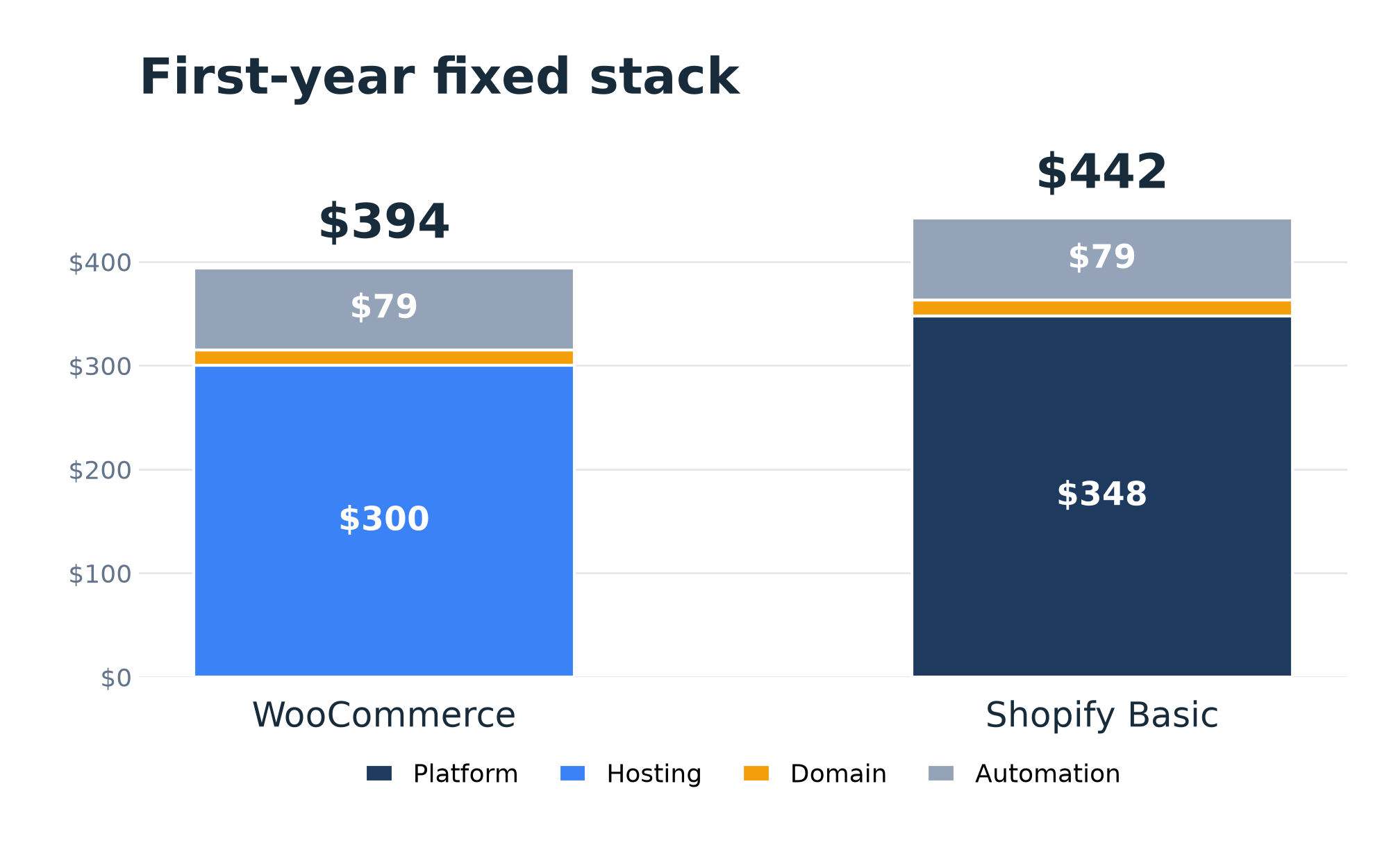
Both stores are set up with a free theme and a domain name worth $15. All routine work is done by the store owners themselves. There is no developer retainer paid. For the WooCommerce store, the monthly hosting cost is set to $25. The $79 official WooCommerce dropshipping extension is added as well. To keep things simple for now the Shopify store is granted the same $79 automation allowance. Please note that this is the price of the chosen app and needs to be changed accordingly.
- Core platform: WooCommerce example $0, Shopify Basic example $348
- Hosting: WooCommerce example $300, Shopify Basic example Included
- Domain planning allowance: WooCommerce example $15, Shopify Basic example $15
- Theme: WooCommerce example $0, Shopify Basic example $0
- Dropshipping automation, Planning for WooCommerce example $79, Shopify Basic example $79 allowance.
- Developer maintenance for WooCommerce example: $0, do it yourself, for Shopify Basic example: $0, do it yourself.
- First-year fixed stack: WooCommerce example $394, Shopify Basic example $442
Assuming all of the above, WooCommerce saves $48 in the first year. However, that difference is very slim and does not account for a host of other costs such as business email accounts, paid design, samples, advertising, payment processing, returns, taxes and time. Switching to a different host or app could potentially reverse the savings in an instant.
For a more detailed list of all Shopify plans and the prices of apps on Shopify, click here. Shopify pricing guide. You can replace the Basic assumption with it in your store, provided you need more staff accounts, more detailed reporting or international functionality.
Payment Fees Belong Outside the Fixed WooCommerce Budget
You can select your preferred payment gateway and there is no WooCommerce platform transaction charge added. All charges are paid by you to the relevant gateway for the processing, and these vary by gateway provider, country, card type and payment method.
The online credit card rates for US online cards for a Shopify Basic plan are listed as 2.9% + 30¢ USD online rate. Using the example of 100 online orders of $50 each, the processing fees would total $175. They are made up of $145 from the percentage and $30 from the fixed rate. We have simply done the arithmetic to establish a base line for comparison with a WooCommerce gateway that quoted the same rate, and the total processing for such a setup would also be $175.
Note that Shopify also lists a 2% third-party payment provider fee on Basic when it does apply, so 2% equals $100 on $5,000 of sales before the provider’s processing charge. Using Shopify Payments changes that comparison. Compare the gateway rate plus any Shopify fee to the advertised card rate on the different plans, rather than just the card percentage.
Order economics also include product, destination shipping, advertising, refunds and replacements. Our guide to calculating dropshipping profit margin gives you the full order-level worksheet.
Renewal Prices Can Change the Second-Year Result
Things like WooCommerce hosting and plugin promotions will make the initial invoice look less than what you really are going to be paying for on an ongoing basis. Make sure you note the renewal cost up front and calculate months two through twelve at that price rather than spreading out the promotional month over the whole year.
Treat your Shopify apps, premium themes and email tools with the same discipline as your other services. A free trial is not the price for a year’s subscription. Keep a simple list to remind you of the renewal dates, prices and the cancellations options for each provider.
For WooCommerce, also budget for paid help to be on call before you actually need it. Hopefully you’ll never use that reserve of yours for such emergency troubleshooting but checkout problems or supplier feed not updating can be a real pain to fix in an emergency. While Shopify takes care of a lot of the server and core maintenance for you, store setup, app review and testing of your store etc. all still need to be done by you.
Put a Value on WooCommerce Maintenance Time
In terms of cash vs. labor, WooCommerce generally costs less than the initial price, but more in terms of labor to maintain. To price this out, make an assumption that you can later change. Using the example above, if WooCommerce takes two hours of extra work per month and you assume your time is worth $25/hour, then WooCommerce would cost $600 per year. This is just a rough example for planning purposes and not meant to be an exact average.
Track your actual time spent on online stores over a month. Make sure to separate time spent on improving a store and time spent on fixing things/re replicating standard updates for compatibility in both channels. Time spent on maintenance/repairs belongs into this comparison as it can increase sales in both channels.
WooCommerce vs Shopify Dropshipping: When Each Platform Wins
When your business needs control of your WordPress website, your hosting, your data, the payment gateways you use and the unique ways you want to function then WooCommerce wins. However, when the bundled infrastructure of Shopify, coupled with the support provided and the much deeper integration with the shipping and fulfillment options your business uses saves you enough time then Shopify wins.
- Core price: Free for WooCommerce (plugin), Paid for Shopify (after trial).
- Hosting: WooCommerce Your choice and responsibility, Shopify Included
- Software updates for WooCommerce: You test and apply them. Software updates for Shopify: Shopify applies core platform updates.
- Payment choice for WooCommerce: Broad gateway choice without a WooCommerce surcharge, Shopify Payments or third-party provider, with fees associated with the relevant Shopify plan.
- Custom code: WooCommerce = Direct access to WordPress & store code, Shopify = Customization within the confines of the Shopify platform & APIs.
- Supplier automation: WooCommerce depends on supplier’s WooCommerce plugin and Shopify depends on supplier’s Shopify app.
- For WooCommerce use the following Tradelle connection: Research tools only (and all the Shopify Research, One click import etc… automated fullfillment etc.. and updated tracking info too)
Choose WooCommerce When Control Solves a Real Problem
WooCommerce is best for existing WordPress sites that need a bit of custom product functionality, total access to your store’s files, or can work with the payment and supplier combinations that WooCommerce supports well. For this option, a developer or very technically confident owner would be best.
The deciding factor has to be a concrete requirement. “WooCommerce is free” is not enough. You have to be able to name the control you need. Buying extra maintenance without any useful added value is not very clever.
Shopify over AmpFinder when speed to market & support are more important than everything else.
Shopify is a good choice when you want to launch a store without having to manage servers, you don’t have a WordPress site that you want to preserve, your supplier’s strongest integration is for Shopify, or you simply don’t have time to run a store and would rather spend that time on designing and testing products, creative ideas, and serving customers.
For users of Tradelle, Shopify supports the complete workflow of product search and import via Shopify up to order tracking and delivery. On WooCommerce, only the search for products via your own setup is supported. Therefore if you wish to use Tradelle as a supplier then Shopify is the better option to go for over setting up an unsupported connection on WooCommerce.
How to Set Up WooCommerce Dropshipping Without a Developer
Setting up a basic WooCommerce dropshipping store does not require a developer. For this type of store, we recommend managed hosting, a standard theme, one payment gateway and one supplier integration that is already supported. Custom checkout code and complex supplier feeds are usually the point where you need paid help.
- Buy hosting at its renewal price.Choose a managed WordPress hosting with backups, SSL, staging and good support. Buy your domain and your business email addresses.
- Install WordPress and WooCommerce.Run the setup wizard and enter your country and currency. Then you can set up the taxes for your business with qualified local advice where necessary.
- Install one lightweight theme.Build out the header, navigation, product pages, cart, checkout and policy pages. Test each step on a phone.
- Configure payments.Enable one trusted payment gateway. Get out the full fee schedule for them and test one transaction before you start to use them.
- Validate the supplier first.Send a sample for checking the product and packaging, confirm the delivery time and get return responsibilities in writing. Our dropshipping supplier guide covers the evaluation process.
- Connect one import and order workflow.Test variants, stock updates, pricing rules, order notifications, tracking and also cancellation handling for a small set of products.
- Rewrite the product pages.Make sure the specifications are correct, shipping time is clearly stated, original text and images are used and that you have permission to use the media you publish. Do not let an imported description make promises your supplier cannot keep.
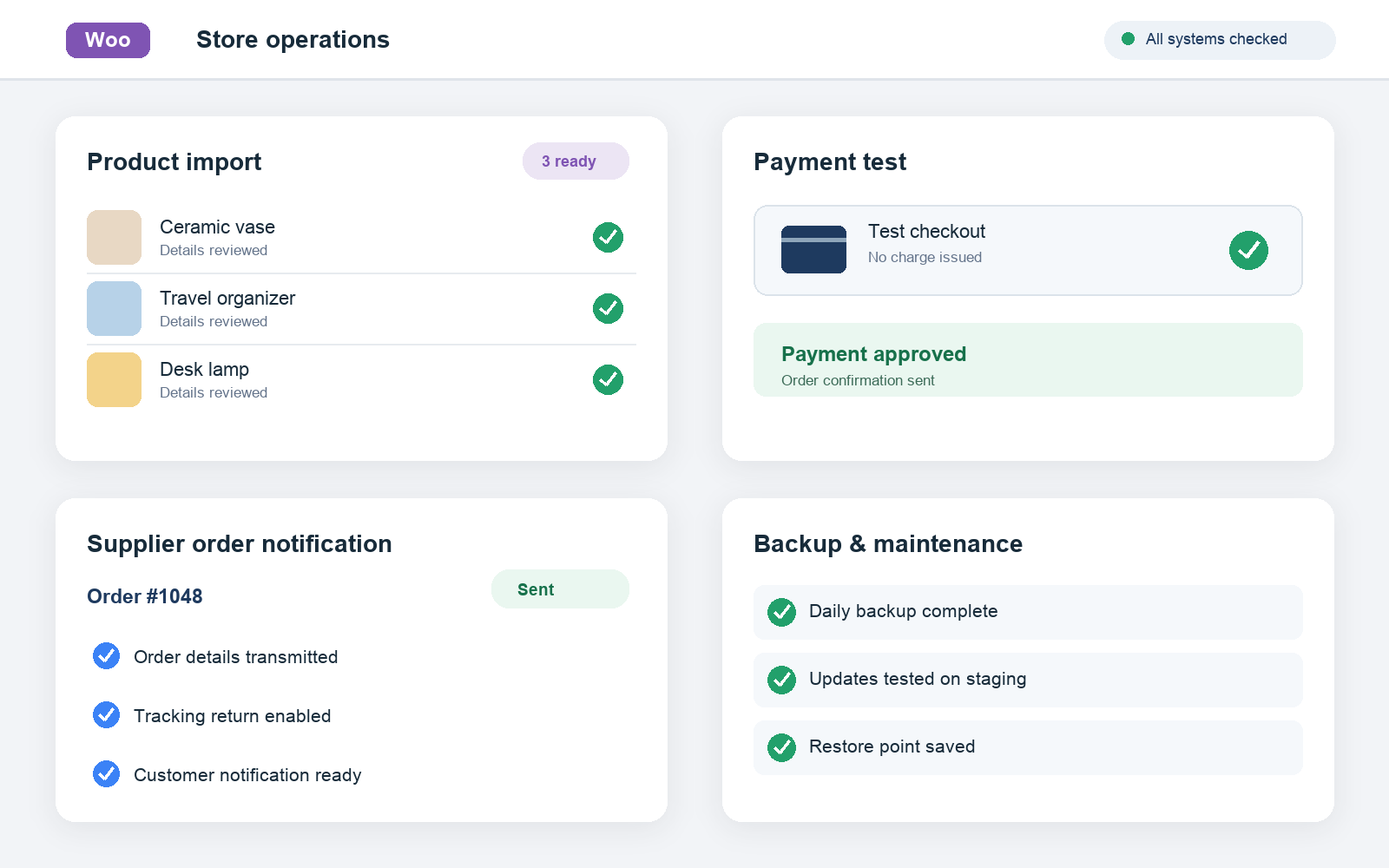
- Run an end-to-end test order.Payment, supplier notification, order status, tracking email from books, refund process. Then schedule for backups and update checks.
If you want a broader launch sequence, our guide on... how to start dropshipping This primarily covers choosing the product to sell, setting up the store and then marketing it. The technical handoffs for later automation are covered here. dropshipping automation.
Product Research for WooCommerce Without Tradelle Fulfillment
Although Tradelle’s import and fulfill connection is Shopify-only, that does not mean that you cannot use it for WooCommerce product research. In order to plan sensibly, it’s better to keep two different tasks: research for products that might make good things to sell, and pick a supplier for WooCommerce and set up the relevant integration for selling and delivering those things.
Use Product Picks for Demand and Competition Evidence
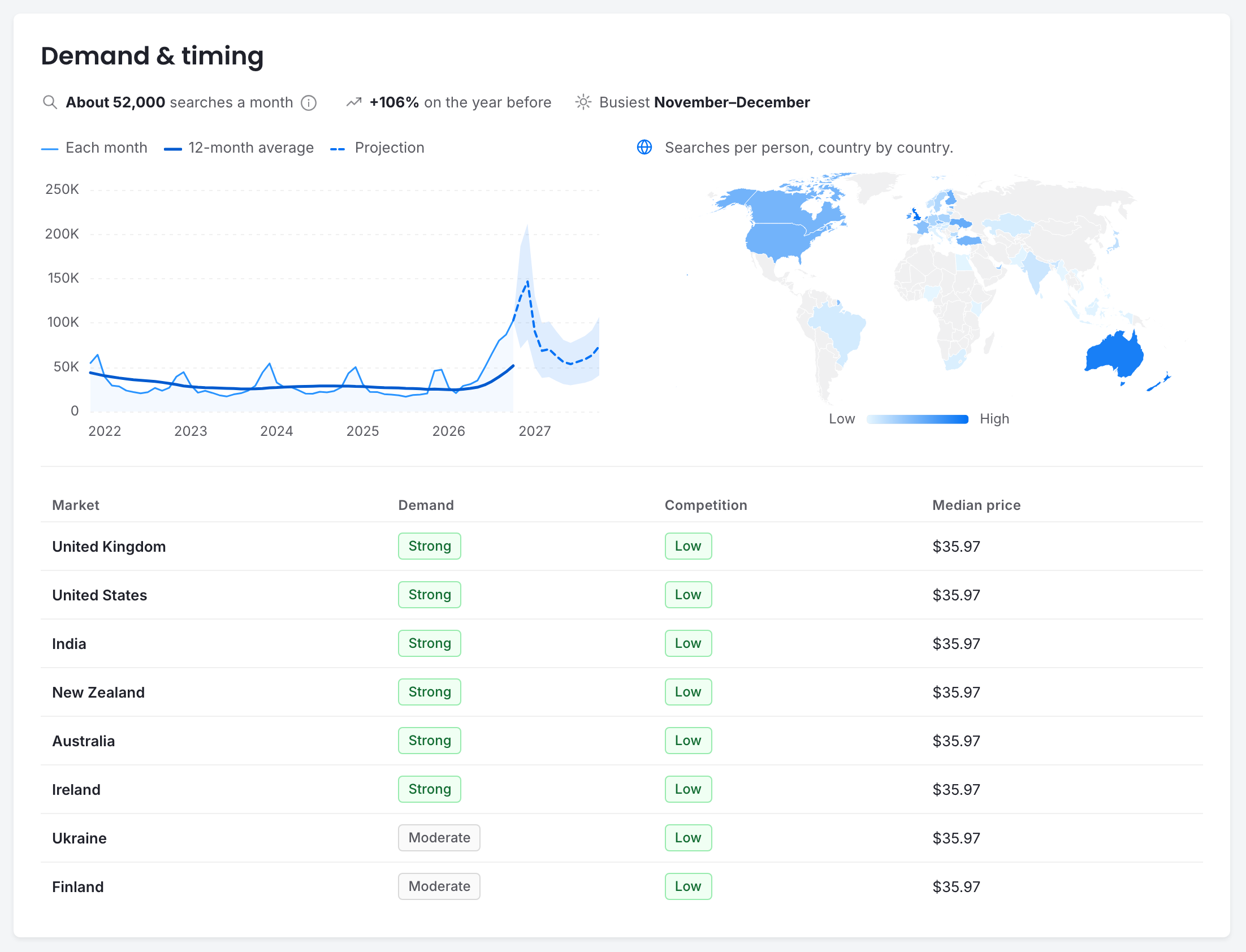
Product Picks Get a detailed Research Report for each product you select, including Search Demand, Seasonality, Competition, Retail Price, Target Buyer and Best Selling Angle. A WooCommerce seller can use the Research to filter out lousy ideas before you waste money importing them or having them designed for import.
The report contains costs of Tradelle catalog items, such as destination shipping and profit. These are supplier figures for the Tradelle catalog and do not create any WooCommerce fulfillment connection. The figures should be recalculated based on your supplier’s product cost, shipping, additional fees etc. as well as their return policy.
Before importing anything, run the idea through our product validation checklist. Consider demand, competition, supplier, delivery and your break-even advertising cost as separate gates.
Use Store Explorer and Ad Explorer for Market Evidence
Store Explorer This does not cover WooCommerce shops, only Shopify stores and TikTok Shops. But it does contain a lot of product, pricing, traffic and estimated revenue evidence for studies of sellers in your niche. You can then apply these lessons to your WooCommerce shop.
Ad Explorer is an Ad Viewer for Meta and TikTok Ads. It shows you the ad duration, reach, estimated spend as well as the used creative formats and scaling signals. Mark good ads and use them as creative briefs to create your own ads for your product and audience.
This research workflow is not limited to any online store. For WooCommerce stores, for example, the boundary of functionality for a seller would be to import their own products, place orders with suppliers, track orders, and handle order fulfillment in Tradelle.
Common WooCommerce Dropshipping Budget Mistakes
One of the most common mistakes people make when thinking about a budget for a WooCommerce dropshipping store is to compare a free plugin for WooCommerce with a paid plan for Shopify. In reality a WooCommerce store costs much more than just the free plugin, as you also have to pay for hosting and renewals as well as the costs for payment gateways, supplier integration software etc. On top of that, there is the cost of maintenance of your store and the cost of individual orders.
- Choosing on the introductory invoice: compare standard and renewal pricing instead.
- Installing overlapping plugins:Every additional integration increases costs and requires even more updates to test.
- Automating an untested supplier:First sample product, test delivery, then add to large product catalog.
- Ignoring cash flow:The timing for customer payments and supplier invoices may differ.
- Copying delivery promises:We publish the window for your actual product and destination.
- Treating maintenance as free:Log your hours and receive paid support as needed.
- Assuming Tradelle fulfills WooCommerce orders: that integration is Shopify-only.
How supplier failure becomes your customer service issue. Read our guide to. managing dropshipping returns and refunds When opening your store, don’t start writing the store policy yet. Your responsibility to customers on the platform hasn’t changed.
FAQ: WooCommerce Dropshipping in 2027
Is WooCommerce good for dropshipping in 2027?
WooCommerce is a good option for dropshipping in 2027 if you want to run a WordPress site and manage your own hosting, updates etc. It is particularly well-suited to content led sites and custom stores. Shopify is better for new sellers who want a complete bundle of hosted services with easy integration to Tradelle fulfillment.
How much does WooCommerce dropshipping cost?
The total cost to you of our example WooCommerce stack in the first year is $394. That figure is based upon us choosing $300 hosting + a $15 domain allowance + the $79 official WooDropship extension. The costs of payment gateways, products, shipping, marketing, returns and labor are all on top of this. Note that the costs of your chosen hosting and integration option can vary very substantially.
Is WooCommerce cheaper than Shopify for dropshipping?
Our examples cost roughly the same in the first year to match functionality (WooCommerce: $394 and Shopify Basic: $442 before order costs and labor). The $48 savings in the WooCommerce monthly fee can be quickly consumed by higher renewals for the WooCommerce compatible hosting, by the cost of individual plugins, or by spending on support.
What plugins are required for WooCommerce dropshipping?
The store and checkout functions are provided by WooCommerce but you will also need to set up a payment gateway as well as supplier integration for importing the products you require, managing orders, updating stock levels and keeping track of deliveries. You will also need to sort out backups and security, often provided by your host or as a separate tool. Don’t buy a plugin unless you have a clear task for the store to complete.
Can you run WooCommerce dropshipping without a developer?
While a simple WooCommerce dropshipping store does not require a developer, it can be run using managed hosting, a standard WooCommerce theme and a supplier plugin with good support. However, updates, checkout, orders, tracking etc. all need to be tested and Site Backups etc. organized. If you require custom code or your supplier feeds require special processing, then you will need to pay for help.
Can Tradelle automate WooCommerce product imports?
Note: Tradelle's one-click importing and automatic order fulfillment is only available for Shopify stores. For WooCommerce stores, Tradelle users can perform product research with Product Picks, Store Explorer, and Ad Explorer and then import products, manage orders, track shipments and more with a WooCommerce compatible supplier integration.
Final Thoughts
So long as control is worth the hassle, WooCommerce dropshipping makes sense in 2027. Create a budget to run a viable online store, not just to use a free plugin. This will also include renewal fees, payment processing, supplier software and your time. Then compare it to Shopify.
Shopify is an easier to manage store with direct Tradelle fulfillment for now. If you are still going to go with WordPress then first validate the product, choose a supplier that is compatible with WooCommerce and test a complete order before you start scaling up.