Product Image Optimization for Dropshipping: 20 Audits (2027)
Product image optimization for a dropshipping product typically means choosing accurate, useful images before finalizing the delivery information and metadata for the product. This means that you will want to answer all of the buyer’s questions prior to upload, such as: Will the product be shown in the color selected? Will the actual size be shown? Will everything in the box be shown? A smaller file or even a keyword-rich alt attribute will not rescue a product page with inaccurate or unhelpful images.
The order of views for your 2027 product pages matters. Supplier galleries can contain a strong demonstration of a product, with repeated angles, and also less relevant views like vague composites or even views with text on them that were taken of a different view. First you decide which views to add and then you can deal with the quality of the supplied images, the alt text, the file names, and the theme’s behavior.
This audit included 20 external listings that were looked up one by one. We’ll see where the good galleries are still lacking, which images earned a “Keep” and where “Replace” would have been better than another round of editing. All stores were anonymous for this audit. The decisions and fixes are concrete enough to be applied to your own catalog.
What 20 Real Dropshipping Listings Revealed
On November 5, 2026, I reviewed 211 images from 20 listings on 17 stores. The image-level findings were 12 Keep, 179 Fix, and 20 Replace. Those numbers add to 211. The defect flags for an image do not add up because one image can have generic alt text, limited source detail, and a repeated view at the same time.

The overlapping flags were 57 missing or empty alt text observations, 139 generic alt text observations, 12 inaccurate alt text observations, and 108 source images with longest side less than 1200 px. There were also 8 source responses greater than 500 KB, 9 near-duplicate views, and 50 images on 4 listings without any scale reference images. 4 images had unclear included parts. 2 were square-cover subject crops, 1 had a tested mobile-zoom issue, and 1 had mobile aspect-ratio distortion.
Ten listings came through Competitor Research and ten through Global Bestsellers. The table is ordered as A and B originally. Action is the first change rather than all of the changes listed for each listing.
| ID | Product | Images | Keep | Fix | Replace | Priority action |
|---|---|---|---|---|---|---|
| A01 | Interactive dog ball | 10 | 0 | 8 | 2 | Clarify item and color choice. Remove two repeats. Add a contents view. |
| A02 | Reusable pet-hair remover | 5 | 0 | 4 | 1 | Replace the repeated size view. Fix blank alt and tested mobile zoom. |
| A03 | Dog paw balm | 7 | 0 | 5 | 2 | Keep application views. Replace two repeated model shots. Fix blank alt. |
| A04 | Mechanical kitchen timer | 8 | 0 | 8 | 0 | Keep matched colorways. Review 800 px sources and blank alt. |
| A05 | Finger-mounted vegetable cutter | 9 | 9 | 0 | 0 | Keep all nine. Parts, dimensions, use views, and alt work together. |
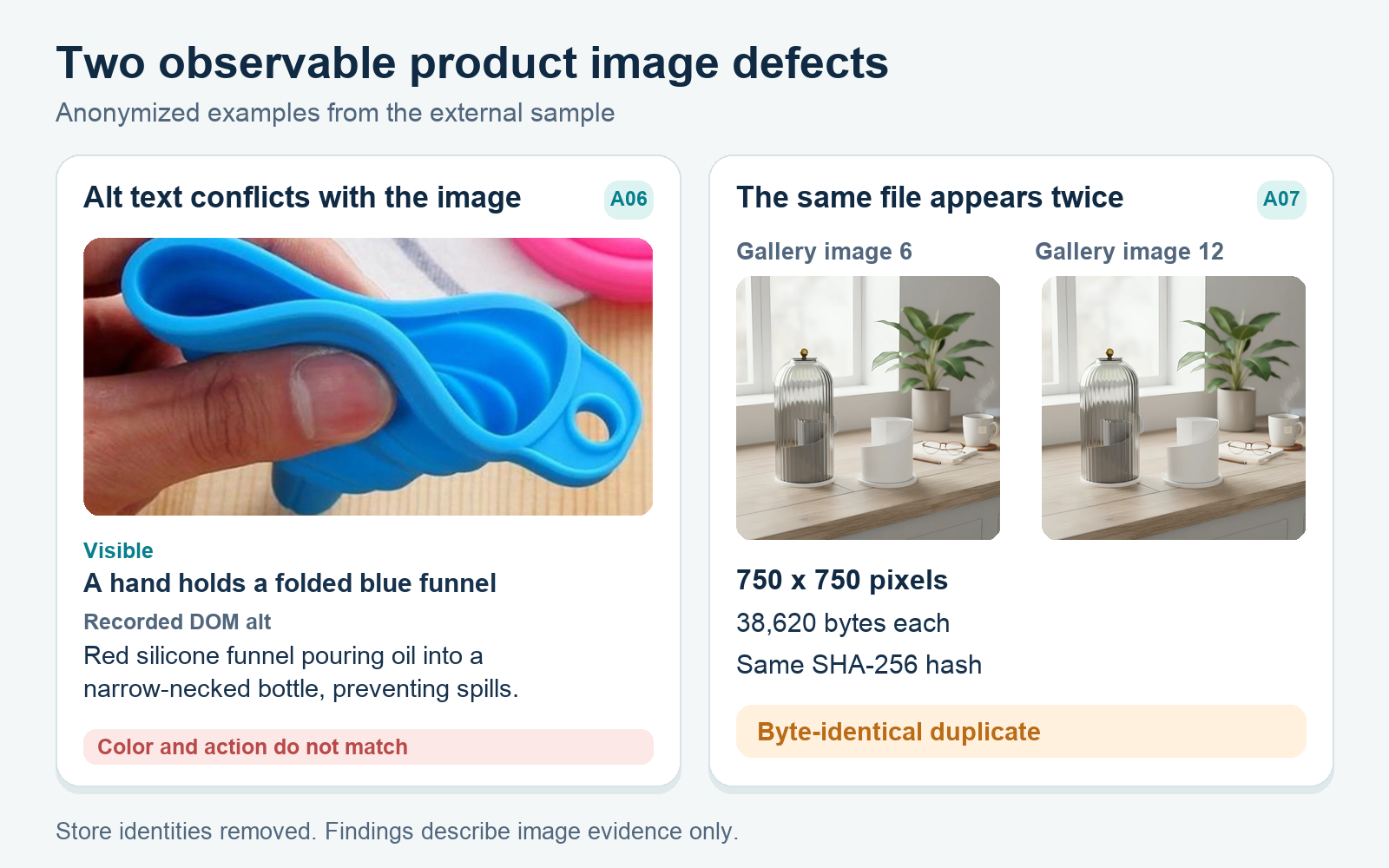
| A06 | Collapsible silicone funnel | 10 | 1 | 8 | 1 | Correct nine inaccurate alts and replace one repeated collapsed view. |
| A07 | Covered makeup-brush organizer | 14 | 0 | 13 | 1 | Remove the exact duplicate. Review limited sources and blank alt. |
| A08 | Automatic hair curler | 7 | 0 | 5 | 2 | Isolate Black for clarity. Add a labeled accessory set. Fix generic alt. |
| A09 | Stretchy baby-wrap carrier | 9 | 0 | 9 | 0 | Demonstrate the promised pouch. Describe each view and color. |
| A10 | Baby cleansing bar | 12 | 0 | 11 | 1 | Remove the repeated package view. Keep distinct pack images. Fix alt. |
| B01 | Waterproof Eyeliner Pencil Set | 6 | 0 | 6 | 0 | Add scale and set packaging. Review 800 px sources and empty alt. |
| B02 | Peel-off Lip Stain | 39 | 1 | 38 | 0 | Add tube scale. Correct generic or inaccurate alt. Keep the instruction view. |
| B03 | Brick + Brick Night | 5 | 0 | 5 | 0 | Describe all five views. Keep the bundle and room context. |
| B04 | Loop Link | 10 | 0 | 10 | 0 | Replace color-token alt. Add closure and attachment close-ups. |
| B05 | boAt Airdopes 121 v2 earbuds | 13 | 0 | 4 | 9 | Replace nine low-detail assets. Show listed accessories and a worn view. |
| B06 | New Era Cap Visor Sticker Paperweight | 2 | 0 | 2 | 0 | Keep front and back. Add dimensions, a side profile, and desk context. |
| B07 | Silver Falling Dew Pendant With Link Chain | 6 | 0 | 5 | 1 | Replace the repeated view. Show the kit and certificate. Fix empty alt. |
| B08 | Forclaz MT100 Hooded Synthetic Jacket | 31 | 0 | 31 | 0 | Fix 31 placeholder alts. Recrop two portraits. Review eight large files. |
| B09 | Wyze Solar Panel | 5 | 1 | 4 | 0 | Label the optional adapter cable. Fix three generic alts. Keep installed context. |
| B10 | Apple 20W USB-C Power Adapter | 3 | 0 | 3 | 0 | Fix mobile proportions. Add scale and plugged-in context. Describe each view. |
Download the full 211-image audit PDF
Prefer to sort or rerun the numbers? Download the complete audit log (CSV).
How to read the audit without overclaiming
This non-representative purposive sample of Shopify stores is based on public still images that can be found in the product-media data and rendered into galleries. For B02 we tested four different colors and for B05 three different colors. All other B-listings were tested with the default selection. For A09 we combined the product JSON with the rendered views for nine assets. No videos were tested.
The dimensions were loaded from the live sources. The bytes describe live source responses, not original uploads or every visitor’s transfer. The 1200 px and 500 KB limits are editorial thresholds, not Google or Shopify rules. We tested desktop and 390 x 844 captures as well as a set of targeted tests. We recognized that a theme could use the same assets with different alternative text, so blank, generic, and accurate instances can coexist. Empty alt alone is not a WCAG conformance verdict.
No exact selected-variant mismatch or explicit misleading text-image contradiction was found for the shops. The findings rather expose shopper questions that were not answered yet, not proven returns, lost sales, rankings, or speed effects. A02's captured copy below the gallery switched to a paw-soother topic. Treat the found content-reuse issue as a separate issue, not a stronger image accusation.
Make the selected variant easy to identify
A08 selected Black, whereas its main asset showed white, pink, and black together. This is an example of variant clarity, not a verified wrong-variant image. Show an isolated view of Black attached to the variant and come back to the multi-color image later. The shopper needs to know what device they are going to receive.
This was done well by others: A04 opened up the selected Cream timer view, and A09's views of Grey Stripes agreed. B02 matched its main image in 4 color checks and B05 in 3. It is worth preserving these mappings were you to swap out the assets for this selection. If selection comes first, then use this product validation workflow to check the offer.
Give scale a job beyond a number
The 50 missing-scale flags sit on B01, B02, B06, and B10. B06 has 2 crisp views at 1920 px but no dimensions, familiar object view, view of the object on a desk, or side profile. The 7 1/2 marking on B06 does not show the paperweight's physical dimensions. B02’s printed volume of 3.5 ml does not show the dimensions of the tube. Add a dimensioned view and a hand or in-use view where relevant.
The pendant B07 shows dimensions, ruler and coin context, chain length, and a worn pendant view. A05 has the corresponding parts marked (7.5 cm and 5.5 cm). B05 avoids this flag as its specs are given (32 x 26 x 17 mm), though a worn or handheld view would still be helpful. Check the gallery and specs together.
Show what arrives, including exclusions
4 images have unclear included parts: 2 images on A01 (mixing colors and a second-looking blue toy without explaining the package), 1 image on A08 (promising a pouch, comb, and 2 clips, but no gallery image clearly isolates and labels that complete accessory set), and 1 image on B09 (showing the adapter cable that is separately sold as an add-on). Label it optional beside the image.
Some other gaps need to be addressed with additional inventory views. A09 does not demonstrate its integrated pouch. B05 is missing the listed cable, documents, and packaging. B07 is missing the promised kit and certificate. B01 explicitly states that no sharpener is included with this product, and B10 states that the cable for this product is sold separately. Let the pictures and product description answer the same inventory question.
Replace repeats with missing information
There were 9 near-duplicates in total for 7 listings: A01 had 2 duplicates, A02 had 1, A03 had 2, A06 had 1, A07 had 1 (which was a byte-identical duplicate), A10 had 1, and B07 had 1. The other near-duplicates were all variations on the same composition with some differences in crop, overlay, and encoding, but importantly useful colorways were not treated as duplicates. Also, colors for A04, extra colors for A09, and pack sizes for A10 required separate judgment, while assets for B02’s color galleries were judged separately because they were shared across different color galleries.
Fill the newly freed slot with the relevant answer. B04 needs a close-up of the attachment opening and magnetic closure. B06 needs thickness and context on a desk. B03 has both bundle components shown with phone and bedroom context, so the five Fixes for B03 all concern descriptions, not a demand for more photos.
Test crops, zoom, and proportions on a phone
A02: The 5th image of A02 did not appear to change size in the captured tap test. B08: Two of the portrait sources had square-cover crops that cut off parts of the person, though the jacket stayed visible. B10: The square hero image used object-fit fill in a 352 x 312 mobile box and therefore had observed aspect-ratio distortion. Find the exact asset or CSS rule, and retest that state.
Avoid blanket mobile claims. A05 / A06 kept products visible in all tested square crops. B07 kept main portraits using contain. B05’s 12 px page overflow and B10’s carousel overflow were not attributed to the galleries without supporting evidence.
Describe the pixels in alt text and file names
A06 is the clearest defect. Image 2 is a folded blue funnel, while its alt describes a red funnel pouring oil. Eight A06 alts incorrectly call the funnel red, and the last also calls a stone-tile background white. Image 3 is ninth: its top-down alt conflicts with pouring. B02 adds three descriptions naming content that is not visible. The 4th image for B02 is an instruction graphic with accurate alt text and a Keep decision.
The generic alt for this product included repetition of the product title, generic lifestyle descriptor tokens, product color tokens, additional marketing descriptor tokens, and placeholder tokens for B08 images. The four A09 color options that were not selected were not mounted and had null media alt, so they were recorded separately from blank DOM observations. Note the actual view and specific variant that was tested. Google's image SEO guidance calls file names a light clue and alt text important context. Use a name such as blue-funnel-folded-side.jpg, then make the alt text self-contained. Your product title has a different job.
Treat source detail and delivery as separate reviews
Below 1200 px, inspect for detail and do not automatically reject. For B01, the 800 px graphics were readable at the observed desktop size. B05 was much clearer. Six 450 px infographics and three 600 px heroes all were marked Replace, while four 1500 px technical graphics were marked Fix for alt text. Create or ask for a sharper original for anything with text, ports, stitching, or controls that need to be zoomed in. Upscaling will not add back detail that is missing.
All eight of the responses over 500 KB were from B08. Review their weight, losing none of the fabric or packed-size detail. These do not prove a slow page. Shopify's image optimization guidance recommends a high-quality source and explains how Shopify serves suitable sizes and formats. Edit from this accurate source instead of further compressing down a previously degraded image.
The Keep, Fix, or Replace Workflow
One image at a time, review the entire gallery. A05 earned nine Keeps as all parts, fit, dimensions, views, and alt text worked well. B08 earned 31 Fixes with rich photography only to have every single alt text use a placeholder-like token. 2 of the crops would benefit from additional reviews, and 8 of the responses exceeded the file size threshold.
- Keep B09, with its installed panel and good descriptive alt text, provides accurate, distinct, and legible views with suitable metadata.
- Fix This is where useful visuals live, particularly when alt text, crop, proportions, source details, or delivery need to be improved. Most of my decisions live here.
- Replace This category includes repeats or non-informative assets. The nine non-informative assets in B05 and the exact duplicate A07 are examples of this category.
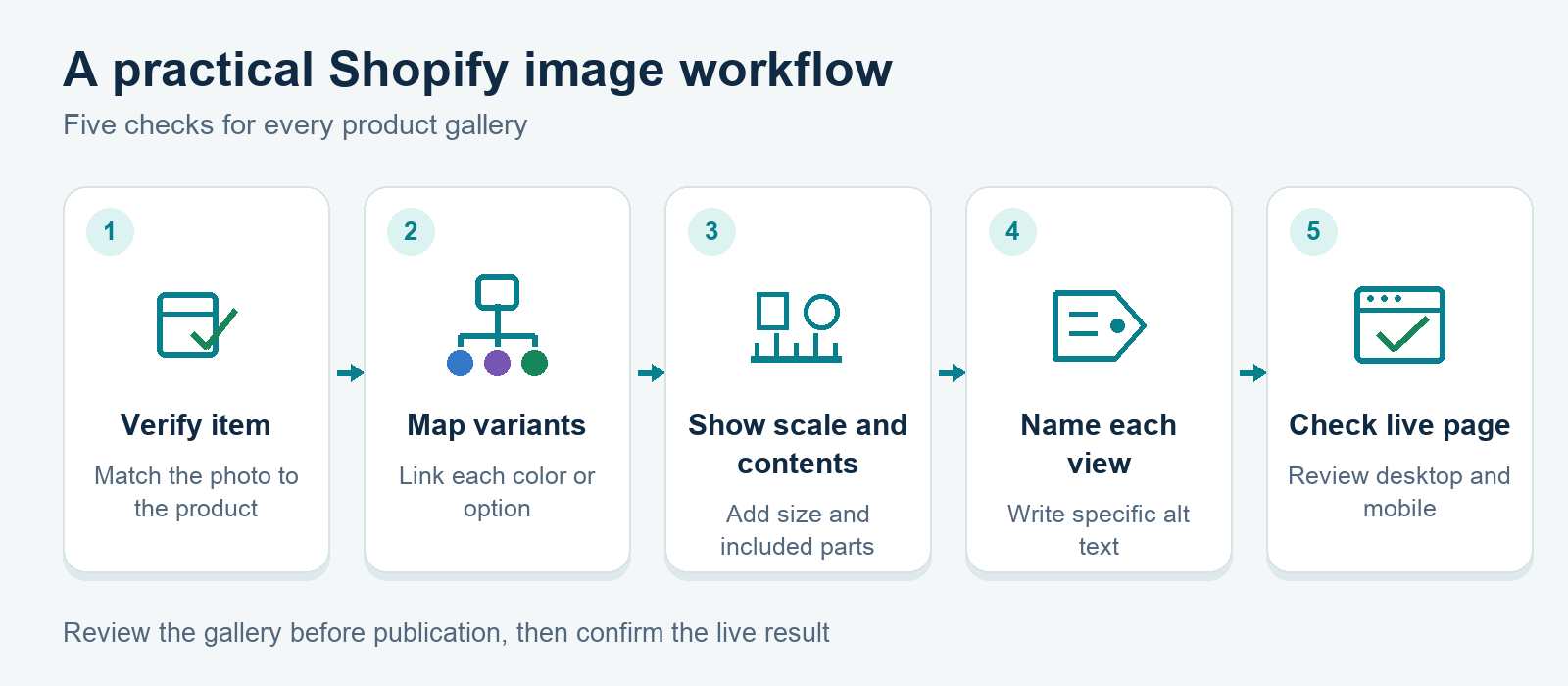
Check the sequence and start with the selected variant. Then add a full view, dimensions, included parts, views of details, and a view of real usage. Then add comparisons to the previous views. Even with a 39-image gallery, every single image needs a reason for it. Even two high-resolution images are not enough.
Use this short pass for one listing:
- Select each of the sellable variants and note what the main image actually shows.
- Start making your list of included, optional, and excluded features and find the images to prove each point.
- Check dimensions, familiar scale, fit, and main physical characteristics.
- Mark repeated compositions and identify the missing view that should be substituted in each case.
- Verify the alt text and file name against the object that is visible, the color, action, and angle.
- Test opening the live page on desktop and mobile. Test crop, zoom, and variant changes.
- Reinspect source responses after upload. Do not treat the bytes of the source responses as upload size.
Take notes against the SKU so they don’t get lost in supplier updates. Review this page after you’ve got your answers for the gallery’s product questions with this Shopify product-page conversion guide. Image work cannot prove a commercial outcome by itself.
Four Positive Product Picks Galleries to Study
Open a Tradelle Product Picks report and ask what each gallery frame explains. These four positive examples were visually checked on November 5, 2026. They illustrate gallery construction, not physical product tests or sales promises.
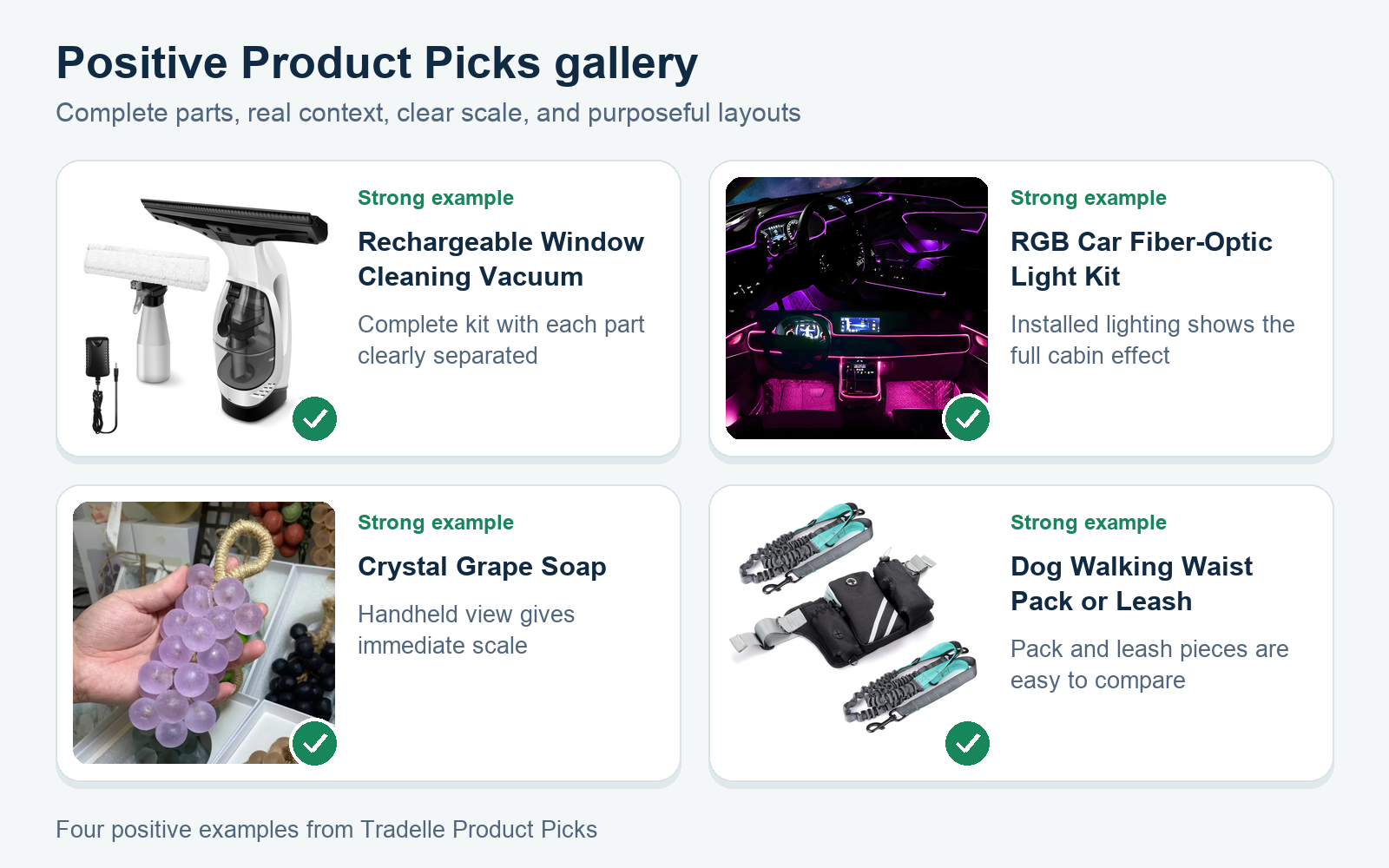
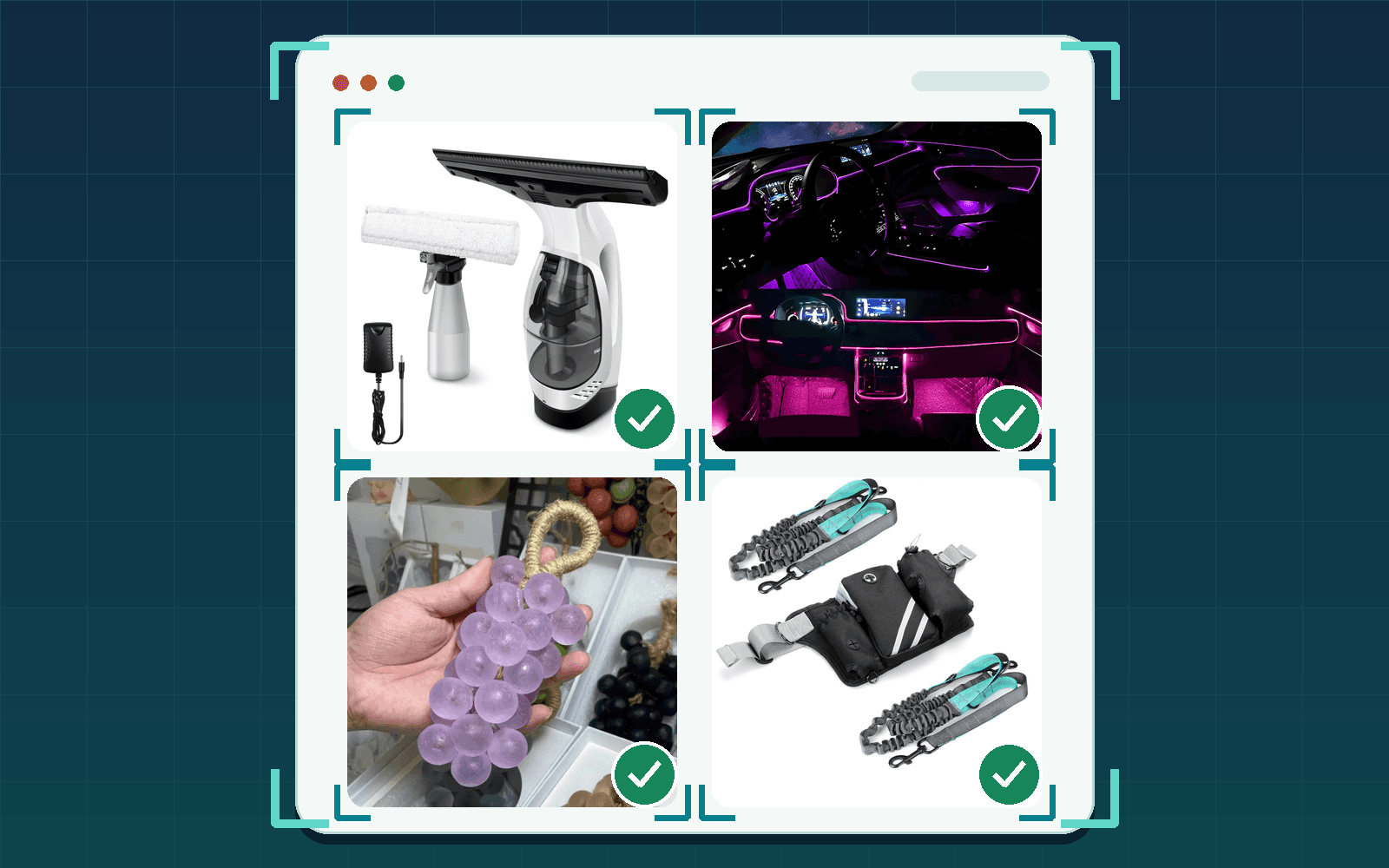
Rechargeable Window Cleaning Vacuum
This first frame is organized into three sections: the vacuum, the spray bottle with microfiber head, and the charger. The first frame shows the complete kit, and a later frame shows the various parts with labeled anatomy. The copy then progresses to explain window use and the three different glass settings.
RGB Car Fiber-Optic Light Kit
The top-down layout shows six LED sources, the power hardware, fiber, and guide tubing, with 315 inches visible. The installed cabin views give you a feel for the whole thing, while the app screens cover controls and 6 numbered close-ups explain installation, especially helpful for products with an abstract setup.
Crystal Grape Soap
A single view marks 18 x 6.5 cm, while a hand-held view gives immediate scale. Faucet and lather scenes add context. All variant shots are consistent and include English language color and scent name descriptions. Shots are viewed in a group shot that compares the translucent range. Separate and clear views are provided for measurement and for choosing of variants.
Dog Walking Waist Pack or Leash
The selected Black Waist Pack is shown with a 33 to 48 inch belt range. Other frames show inventory, compartment measurements, outdoor use, control handles, and leash construction. These product details show how this product is different from the separate leash-and-collar option, and the exact options are shown with exact visual evidence.
Look for these visual jobs rather than copying a supplier's style. A wider set of dropshipping product research tools can surface listings to inspect. Build your shot list around your buyers' questions.
A Shopify Image Workflow You Can Repeat
Make the workflow around the exact SKU, not a directory of generic supplier assets. Shopify's product media documentation covers adding and managing media, including variant images. The admin work is only half the job. Your live theme determines what your customers will actually see online.
- Verify physical unit, name of variants, included parts, and claims before selecting assets.
- Create an accurate, high-quality source or ask someone else to create one with clear details and sufficient room for cropping.
- Deliberate covers and detail crops should only be exported once from this source. Uploads should not go through multiple cycles of lossy compression.
- Name your files as the actual product and view and add a short alt description of the visible variant, action, and angle.
- Upload the media and then select the exact image for each of the matching variants. For the color work, keep this separate from the selected hero.
- Automate generation of responsive sizes and negotiate compatible formats with Shopify's CDN instead of having to manually create and maintain a stack of downgraded copies.
- Review the published web page across desktop and mobile phone screen widths. Review all variants, all thumbnail views, all zoom controls, and all text graphics deemed critical.
Make fresh-eyes checks on the product upload. Can you tell item, size, contents, and main control without reading the product name? Is there sufficient detail to justify the product being sold? Does the mobile version of each image maintain correct proportions? Record any failures against the relevant product variant and image position and go and fix that exact point. Don’t just judge the upload screen.
Where AI Image Editing Helps and Where to Stop
The AI can now clean the background, suggest a crop and even start to draft the alt text for you to review. It is always a good idea to keep the original and view them at full size to compare. Color, shape, texture, ports, logos, dimensions, and what other parts are included all need to match the product that you will be shipping. A polished invention is still an invention.
Don’t generate missing accessories, alter the result to a different demonstration or imply a capability that hasn’t been supported. Be cautious when referencing AI-generated scale and hands. Shoot the real sample for those types of work. If you are using AI to draft metadata, verify every noun against the pixels before publishing.
FAQ: Product Image Optimization
What size should dropshipping product images be?
Make sure to use an accurate source for your theme’s largest useful display and zoomable area. Although the audit above noted sources under 1200 px for editorial review only, note that this is not a requirement from Shopify or Google. Review small text and details on the live version of your pages and files. Don’t upscale a weak file just to hit a number.
How many product images does a listing need?
There is no fixed quota for the number of product images. Cover the selected variant, appearance, scale, contents, key details, and use where relevant. In A05 each of the 9 images contributed relevant information, hence it earned 9 Keeps, not because 9 was the target. B06 had two sharp images but lacked scale and context. Add answers, not extra angles.
Should every product image have alt text?
Alt text for informative product images should describe the visible content of the image and how it can be viewed. Decorative images can use empty alt text. The audit counts observed product-media DOM instances, not a sitewide accessibility verdict. Avoid lists of keywords and copied product titles. Instead, identify and name the object, variant, action, or detail shown in the image.
Do image file names matter for SEO?
File names are a light clue for Google, but the important context is the alt text. Name your files with short and accurate names (e.g. black-curler-front-view.jpg). Your file name will not be able to compensate for an inaccurate image, missing scale, or generic alt text. Treat file naming as another form of clean metadata that you add after you have got the visual part right.
Can I use my supplier's product images?
We use assets we are permitted to publish and double-check them against the exact items and variants you are selling. Supplier galleries can contain many different color versions, and different parts and accessories. We would like you to add your own measurements, a contents list, and as many close-ups as necessary to answer your questions. A real sample helps check finish, scale, packaging, and details that a composite image may hide.
Will better product images increase conversions?
This audit does not guarantee conversion, return-rate, ranking, or revenue changes. It simply outlines unanswered shopper questions and observable technical issues. Fix them. Go and check the live page. And analyze the results for your online shop by yourself. Do not assign causation to images alone when pricing, traffic, offers, and other elements may change.
Final Thoughts
Don’t optimize against bad info. Stick to the sound info and only then fix the description, crop, source, or delivery to get it right. Replace repeats and weak assets with the evidence the shopper needs in the answers the gallery provides. Let a gallery earn its length.
Run the listing checklist on a single listing of your choice today. Check variant, scale, contents, missing views, mobile behavior, and metadata. If you are reshaping the wider page, these ways to increase Shopify sales offer a next review layer without treating images as a guaranteed result.