How to Get Shopify Products Recommended by ChatGPT (2027)
You can make your Shopify products eligible for ChatGPT recommendations through Shopify Catalog, then improve the product data, crawler access, and trust signals that help ChatGPT understand them. There is no optimization switch that guarantees a recommendation. The useful work is less mysterious: give the system accurate facts, keep those facts current, and test what shoppers actually see.
For eligible merchants selling to US buyers, Shopify says its Catalog lists products by default and syndicates them to connected AI platforms, including ChatGPT. That changes the job for 2027. You usually do not need to build a separate OpenAI feed. You do need to check whether your products are eligible, complete, and consistent wherever shoppers encounter them.
This guide walks through a practical audit for a Shopify or dropshipping store. You will rewrite one weak listing, check the technical access that still matters, and build a 30-day prompt test without inventing ranking factors or buying another app on faith.
How ChatGPT Finds Shopify Products
ChatGPT does not walk through your store like a person with a shopping basket. It can receive structured product information from Shopify Catalog, surface relevant options in a conversation, and send the shopper to your store through an in-app browser. Shopify’s agentic commerce documentation says Catalog standardizes product data and checks pricing and inventory in real time.
Shopify Catalog is the starting point
Shopify Catalog is the structured product layer behind Agentic Storefronts. It can pass titles, descriptions, images, prices, inventory, and shipping information to connected AI platforms. Shopify says eligible products are included by default, with no separate app or custom integration required for Catalog itself.
Eligibility still has boundaries. As of October 2026, Shopify lists ChatGPT for merchants in Catalog that sell to US buyers, regardless of where the store is located. Channel availability and checkout behavior can change, so confirm your own admin under Settings, Sales Channels, Agentic Storefronts before treating this as a 2027 setup checklist.
Being in Catalog also is not the same as being recommended. Shopify names data quality, relevance, availability, pricing, and engagement as signals that AI platforms may use. Each platform controls its own results. Your realistic goal is to remove avoidable reasons for a product to be misunderstood or skipped.
Crawler access still matters
Catalog does not make your public store irrelevant. ChatGPT can also use web sources when answering shopping questions, and those sources need to be reachable. OpenAI uses OAI-SearchBot to surface websites in ChatGPT search features. Sites that opt out of that crawler are not shown in ChatGPT search answers, although they can still appear as navigational links.
This is where a useful distinction gets lost in generic AI SEO advice. GPTBot and OAI-SearchBot have separate jobs. OpenAI says GPTBot collects content that may be used for model training, while OAI-SearchBot supports search. You can allow search discovery and disallow training. Changing one setting does not change the other.
A recommendation is an outcome, not a field you can fill
You cannot add a magic tag that forces ChatGPT to choose your product. Product schema cannot do it. An llms.txt file cannot do it either. Those files may organize information, but the platform still decides which result best answers a particular shopper in a particular context.
That is good news for a smaller store. You can control whether your candle warmer is recognizable as a flame-free gift under $50 with tracked shipping. You cannot control every competing offer, the shopper’s follow-up question, or the model’s selection. Work on the first list and measure the second honestly.
Give AI Product Data It Can Use
A shopper rarely asks for a product by your internal SKU. They ask for “a quiet gift for someone who likes candles,” “a warmer that fits large jars,” or “something under $50 that does not need a lit wick.” Your listing needs enough specific information to connect those requests to the right variant.
Start with a title that identifies the product
Supplier titles often stuff every possible keyword into one breathless sentence. The opposite problem is a brand name that says too little. “Aurora Halo” could be a lamp, a speaker, or a skincare device. “Aurora Electric Candle Warmer Lamp with Timer and Dimmer” tells the shopper and the machine what the item is.
Put the product type first, then add the attributes that genuinely separate the offer. Do not copy a supplier’s claims about safety, health, materials, or certifications unless you can verify them for the exact model. If you need a broader copy refresher, Tradelle’s guide to writing product descriptions that sell covers the customer-facing side.
Fill the attributes behind follow-up questions
A good product page anticipates the next question. For a candle warmer, that might be candle diameter, height adjustment, voltage, timer settings, bulb replacements, and whether the jar is included. For apparel, shoppers need fabric, fit, measurements, care, and the exact variant shown in each photo.
- Identity: product type, brand, model, category, and intended use.
- Fit and compatibility: dimensions, sizes, supported devices, and what comes in the box.
- Materials and requirements: fabric, ingredients, power, voltage, or care instructions where relevant.
- Offer: current price, available variants, shipping cost, delivery estimate, and return window.
- Evidence: real reviews, original photos, tested claims, and a named seller behind the store.
These details help people compare products even when an AI assistant never mentions yours. They also reduce the temptation to write vague copy such as “premium quality” or “perfect for everyone.” Specific beats enthusiastic.
A worked example: from a vague listing to a comparable offer
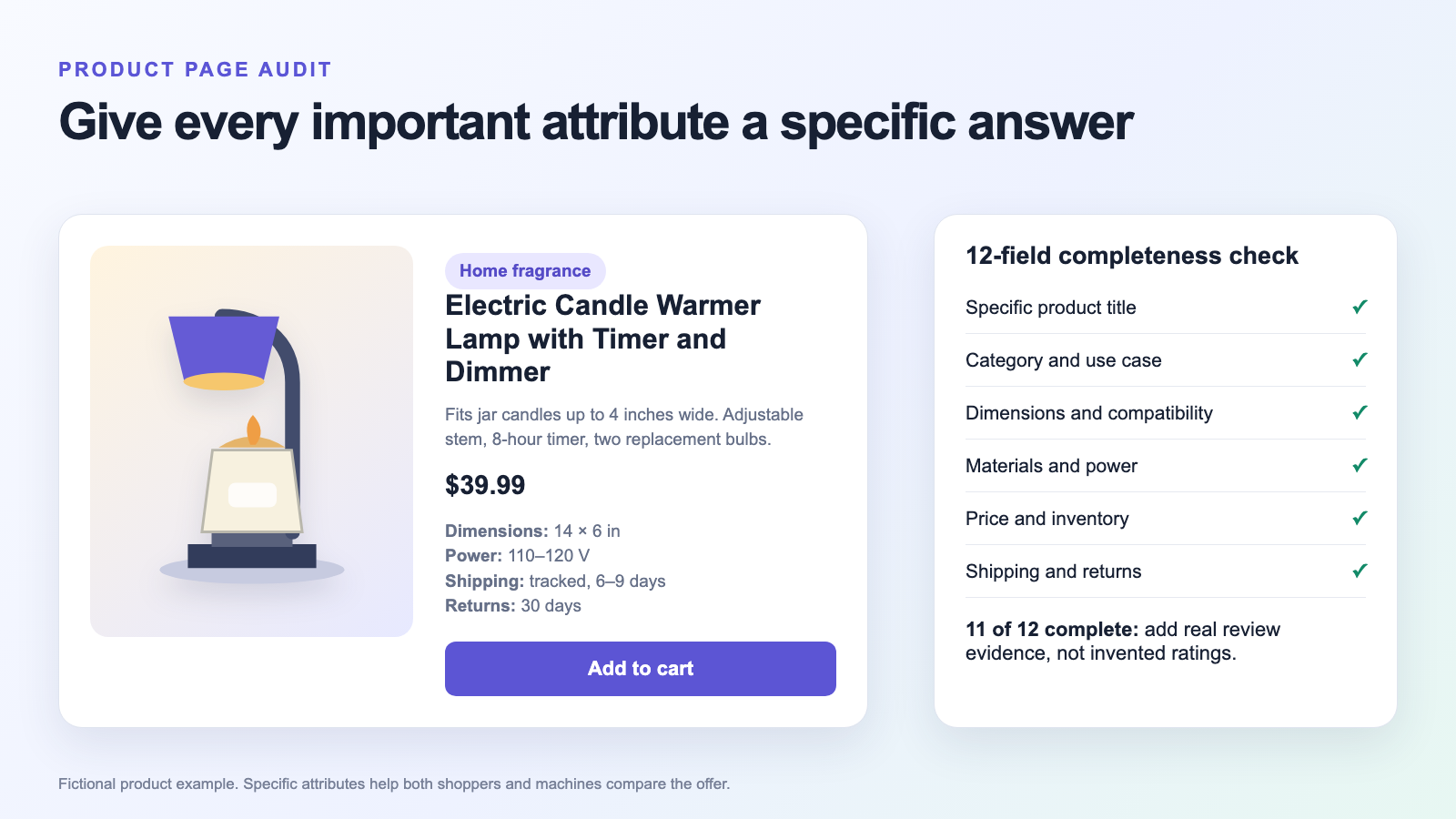
Consider a fictional candle warmer listing. The original title is “Flameless Aromatherapy Device.” Its description says “high-quality home decor with easy operation,” and the only specification is “plastic.” A shopper asking for an electric warmer with a timer has little to work with.
A better title is “Electric Candle Warmer Lamp with Timer and Dimmer.” The revised description says it fits jar candles up to 4 inches wide, has an adjustable stem and an 8-hour timer, runs on 110 to 120 volts, and includes two replacement bulbs. The page shows the exact 14 by 6 inch footprint, a $39.99 price, tracked 6 to 9 day delivery, and a 30-day return window.
Now the product can be compared against a concrete request: “Find a flame-free home fragrance gift under $50.” The warmer matches the use case and price. The timer and dimensions answer likely follow-ups. None of this guarantees a recommendation, but the offer no longer depends on an algorithm interpreting “high-quality” as a specification.
Run a 12-field completeness audit
Choose five products with the best combination of demand and margin. If you are still choosing candidates, start with a repeatable dropshipping product research process rather than polishing a weak item. For each product, mark these 12 fields as complete, missing, or unverified: title, category, use case, dimensions, compatibility, materials, requirements, images, price, inventory, shipping, and returns.
Suppose a listing has five complete fields, three missing fields, and four unverified fields. Only 5 of 12 are usable, or 42%. After you measure the product, confirm the variant, and publish the policies, you might reach 11 of 12, or 92%. The remaining field could be genuine review evidence. Do not fill that gap with imported ratings you cannot substantiate.
This percentage is an editing aid, not an AI visibility score. It gives you a before-and-after record of the inputs you changed. That matters when you later compare prompt results.
Keep Price, Stock, Shipping, and Returns Consistent
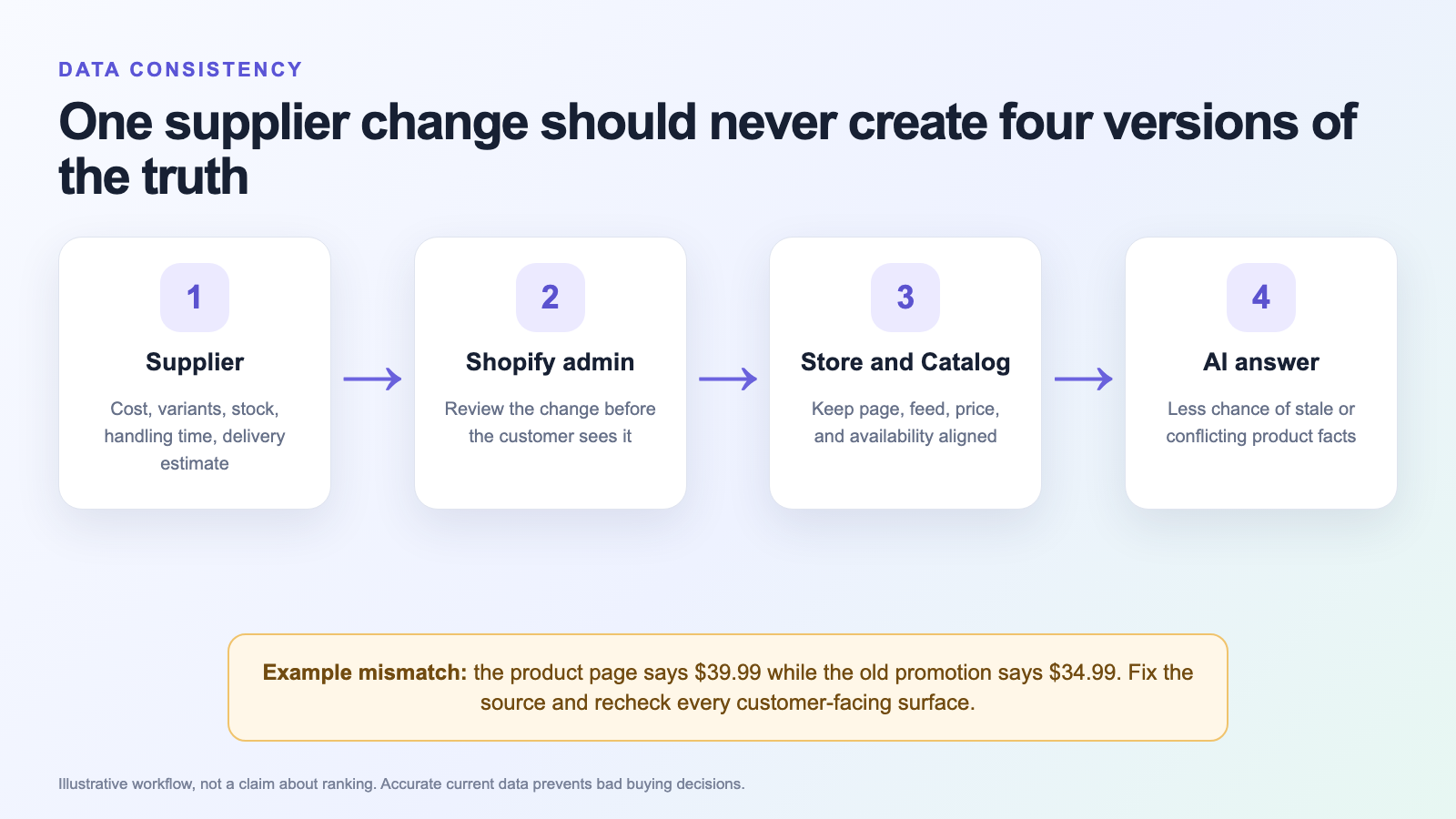
AI shopping makes stale product facts more visible. A recommendation that quotes the wrong price or an unavailable variant creates a poor handoff to your store. Even when the shopper never uses an AI channel, the same mismatch damages trust.
Review supplier changes before they multiply
Dropshipping adds another data source: the supplier. A cost change can alter your price. A removed variant can strand old photos and copy. A longer handling time can turn a reasonable delivery promise into a complaint. Set a recurring check for your active products instead of assuming yesterday’s import is still accurate.
- Compare the supplier’s current price, variants, stock status, and handling time with Shopify.
- Check the public product page, structured data, Catalog mapping, and active promotions after every meaningful change.
- Remove claims and images for variants you no longer sell.
- Recheck delivery estimates by destination, not just the supplier’s best-case headline.
Tradelle’s product import workflow can reduce manual copying, but automation does not absolve you from checking the offer. Treat the imported listing as a draft. Your store is responsible for what the customer sees.
Make shipping and returns plain enough to quote
A clear policy names the destinations, costs, handling time, estimated transit range, return window, and any exceptions. “Fast shipping” is not useful information. “Tracked delivery in 6 to 9 business days to the contiguous US” gives a shopper something concrete to compare.
Your product page, checkout, policy pages, and merchant data should tell the same story. Google’s merchant listing documentation explicitly supports shipping and return information in product data, which is another reason to keep these details structured and current. Tradelle has a shipping policy template and a return and refund policy template if you need a starting point. Adapt them to what you can actually honor.
Do not optimize the promise beyond the operation
There is no visibility win worth an invented delivery date. If a supplier struggles during peak season, update the estimate or pause the product. If you use Fulfillment by Tradelle, confirm the actual service and destination before copying a shipping range into a listing.
This is especially important for products with batteries, fragile parts, size variants, or destination restrictions. An AI assistant can only repeat the facts available to it. You are still accountable for whether those facts describe the order that arrives.
Technical Checks Without an App Spiral
Start with the free checks. You can inspect robots.txt, validate structured data, and read the rendered HTML before installing anything. Shopify already handles much of the Catalog plumbing for eligible merchants.
Check OAI-SearchBot separately from GPTBot
Open your public robots.txt file and look for rules that apply to OAI-SearchBot as well as wildcard rules that apply to every crawler. If you want search discovery, allow OAI-SearchBot on public product and content pages. Also check your CDN or firewall, because an allow rule cannot help if the request is blocked elsewhere.
OpenAI’s crawler documentation says a robots.txt change can take about 24 hours to reach its search systems. It does not promise recrawling, indexing, or a recommendation within 24 hours. Keep GPTBot on the setting that matches your training preference; it is a separate decision.
Validate product structured data on the public page
Product structured data gives search systems a consistent way to read names, images, offers, prices, availability, and reviews. Google distinguishes product snippets from merchant listings, which are for pages where customers can buy from you. Its product structured data guide also covers shipping and returns.
Shopify says Catalog provides the relevant schema fields automatically. You should still test representative URLs, especially if you use a custom theme, a page builder, or several SEO apps. Run Google’s Rich Results Test, fix critical errors, and make sure the markup matches the visible offer. More markup is not better when two apps disagree.
Keep essential facts in the rendered HTML
View the page source or disable JavaScript and check whether the title, description, price, variant information, shipping, and returns are still present. A beautiful interface that hides essential facts behind a fragile script makes the page harder for every machine to interpret. It can also make the buying experience worse on a slow phone.
Do not begin with llms.txt, a new AI app, or a pile of generated FAQs. OpenAI’s public crawler instructions focus on robots.txt and crawler access, while Shopify documents Catalog as the product-data route. Optional files and apps are secondary to getting those fundamentals right.
Build Trust Beyond the Catalog
Product data tells an AI system what you sell. Trust evidence helps show whether the offer is worth presenting. This part is slower, and it cannot be fixed by pasting supplier reviews into a theme.
Use reviews you can stand behind
Collect reviews from actual orders and keep the product, variant, and rating data connected. Do not invent an aggregate rating to make the schema look complete. A smaller number of genuine, specific reviews is more useful than hundreds of interchangeable comments about “great quality.”
Original photos and practical answers to pre-sale questions add another layer of evidence. Show the product’s scale, ports, packaging, and real use. If you make a performance claim, test the exact item or cite reliable evidence. This is normal merchandising discipline, not an AI trick.
Make the seller visible
A shopper should be able to find your contact details, policies, and business identity without opening a support ticket. Keep those pages crawlable and consistent with checkout. A clear seller matters when an AI answer sends someone to a store they have never heard of.
Independent mentions can help people and search systems understand your brand, but off-site authority is a separate workstream. Do not buy random links or manufacture comparison articles. Earn relevant coverage, publish useful buying guides, and keep the product page honest when that coverage arrives.
A 60-Minute Audit and a 30-Day Measurement Plan
You need a baseline before the edits. Without one, every later recommendation feels like proof of whatever you changed last. Save the evidence first, then work on five products rather than rewriting the whole catalog in a weekend.
The first 60 minutes
- Minutes 0 to 10: confirm Catalog and Agentic Storefronts eligibility for your market.
- Minutes 10 to 20: check robots.txt, crawler blocks, and representative URLs in the Rich Results Test.
- Minutes 20 to 40: score five products against the 12-field audit and record missing or unverified facts.
- Minutes 40 to 50: compare price, inventory, shipping, and returns across supplier, admin, and public pages.
- Minutes 50 to 60: save 12 shopping prompts and their current answers, links, dates, and model details.
Pick products with a reason to exist in your catalog. Strong margins and reliable fulfillment matter more than a fashionable keyword. Tradelle’s product picks can help with discovery, while the profit margin guide helps you check whether more visibility would be worth having.
Build a fixed prompt panel
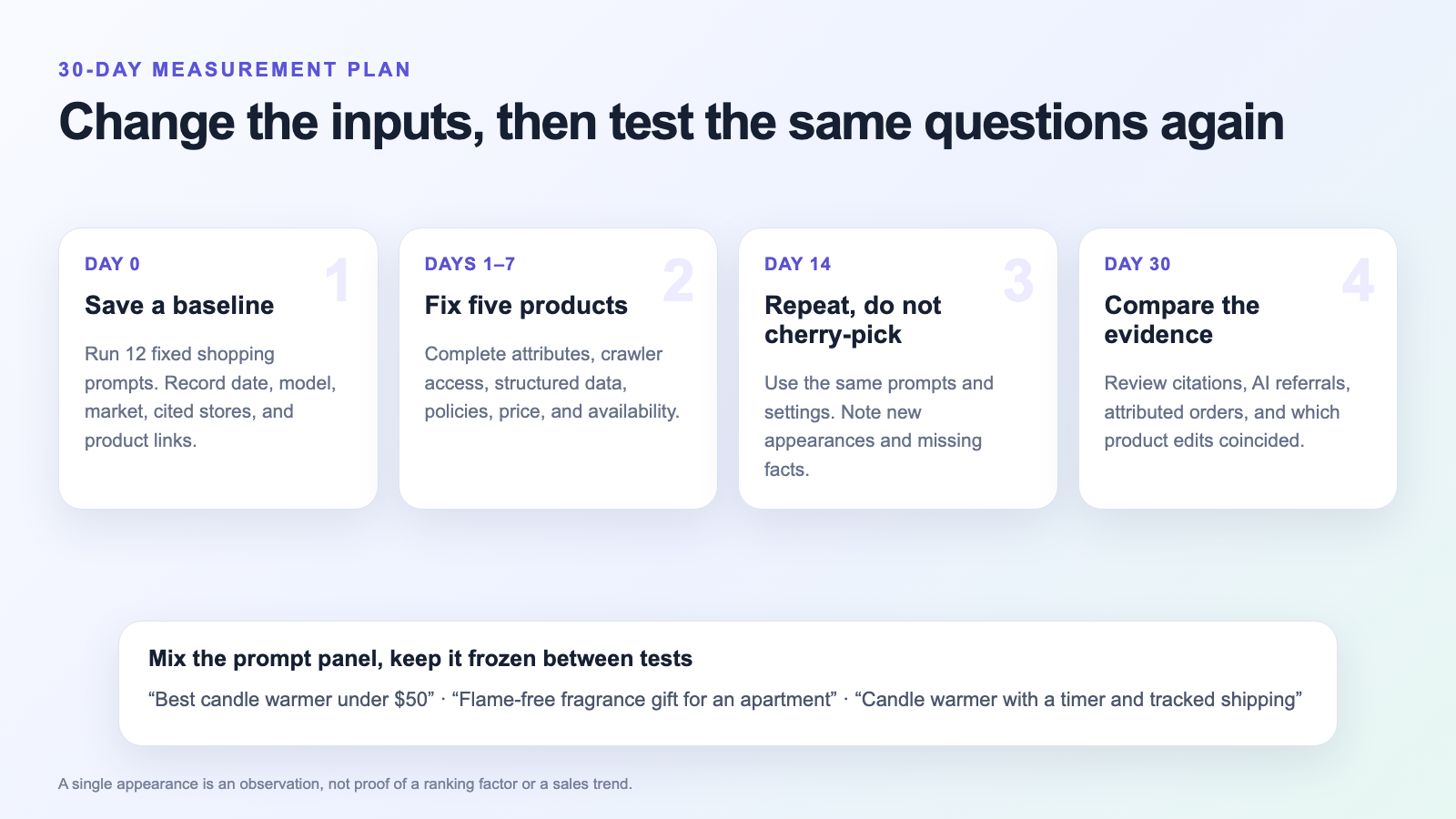
Use 12 prompts that reflect real buying situations. Include three broad category searches, three use-case requests, two budget constraints, two feature comparisons, one shipping request, and one gift request. Keep the wording, market, and test conditions consistent between runs.
For the fictional warmer, the panel could include “best candle warmer under $50,” “flame-free fragrance gift for an apartment,” and “candle warmer with a timer and tracked shipping.” Replace those with prompts your customers would genuinely ask. Do not write 12 variations of your brand name.
Record the date, model, market, whether browsing was used, the recommended products, cited sources, and destination links. Save screenshots where possible. Run the panel on day 0, day 14, and day 30. A single appearance is an observation, not a controlled experiment.
Measure referrals and orders alongside appearances
Shopify says orders from supported AI channels appear in the admin with channel attribution. Review those reports alongside your analytics referrals and prompt log. Separate discovery from sales: a product can appear in answers without earning a click, and a referral can come from a shared link rather than your latest edit.
At day 30, ask three questions. Which product facts were missing before? Which appearances or referrals changed? What else happened during the same period, such as a price promotion or a stockout? The answers guide the next audit. They do not prove a universal ranking rule.
FAQ: Shopify Products and ChatGPT Recommendations
How do I get my Shopify products into ChatGPT?
For eligible Shopify merchants selling to US buyers, Shopify says products enter Shopify Catalog by default and can be syndicated to ChatGPT. Check Agentic Storefronts in your admin, then keep product data accurate and complete. Inclusion makes discovery possible. It does not guarantee that ChatGPT will recommend a particular product.
Do I need to submit a separate product feed to OpenAI?
Most eligible Shopify merchants do not need a separate feed because Shopify Catalog handles product syndication to connected AI platforms. Custom platforms and ineligible setups may need a different route. Confirm your own Catalog eligibility and channel settings before paying for feed development or another integration.
Can dropshipping products appear in ChatGPT recommendations?
The dropshipping model alone does not answer that question. The product and merchant must meet the relevant Catalog and channel requirements, and the AI platform chooses what to show. Accurate variants, honest delivery estimates, clear returns, and reliable fulfillment are especially important when a supplier controls part of the order data.
Does allowing GPTBot improve ChatGPT product visibility?
OpenAI documents GPTBot and OAI-SearchBot as separate controls. GPTBot concerns content that may be used for model training, while OAI-SearchBot supports ChatGPT search discovery. Allowing GPTBot is not a documented shortcut to product recommendations. Set each crawler according to your own search and training preferences.
Does Product schema guarantee a ChatGPT recommendation?
No. Product schema can make visible facts easier for search systems to interpret, and it can support eligibility for enhanced search experiences. It does not force ChatGPT to select your product. Accurate markup should match the page, current offer, and genuine review evidence rather than adding claims you cannot support.
How long does it take to appear in ChatGPT shopping results?
There is no fixed recommendation timetable. OpenAI says a robots.txt update may take about 24 hours to reach its search systems, but that is only one technical step. Catalog updates, crawling, product eligibility, competition, and the shopper’s request can all affect what appears. Measure changes over several prompt runs instead of watching one day.
Final Thoughts
Getting Shopify products recommended by ChatGPT starts with eligibility, but the everyday work is product management. Write a title that identifies the item. Publish the attributes shoppers ask about. Keep the price, stock, delivery, and returns aligned. Allow the right crawler, validate the page, and use evidence you can defend.
Then test the same shopping questions over time. You will learn more from a small, honest record than from another dashboard promising instant AI visibility. Better product data helps shoppers compare your offer wherever they find it, including when no AI assistant is involved.